Move a group to Team
Move a Family group to the Team plan from the Plan page. Team gives you seats for 10 people instead of 5.
Before you start
You pay for the group with your own Family plan.
You are the workspace owner. Only the owner can open the billing portal.
Your card details, to change plan in the billing portal.
Steps
Select Plan in the sidebar. Your plan and Your groups sit at the top.
Under Plans, find the Team card. It shows $6.99 a month or $59 a year. Select Change plan in your billing portal.
In the billing portal, choose Team and confirm.
Back on Plan, check Your groups. The meter reads Seats on your Team plan and shows your count out of 10.
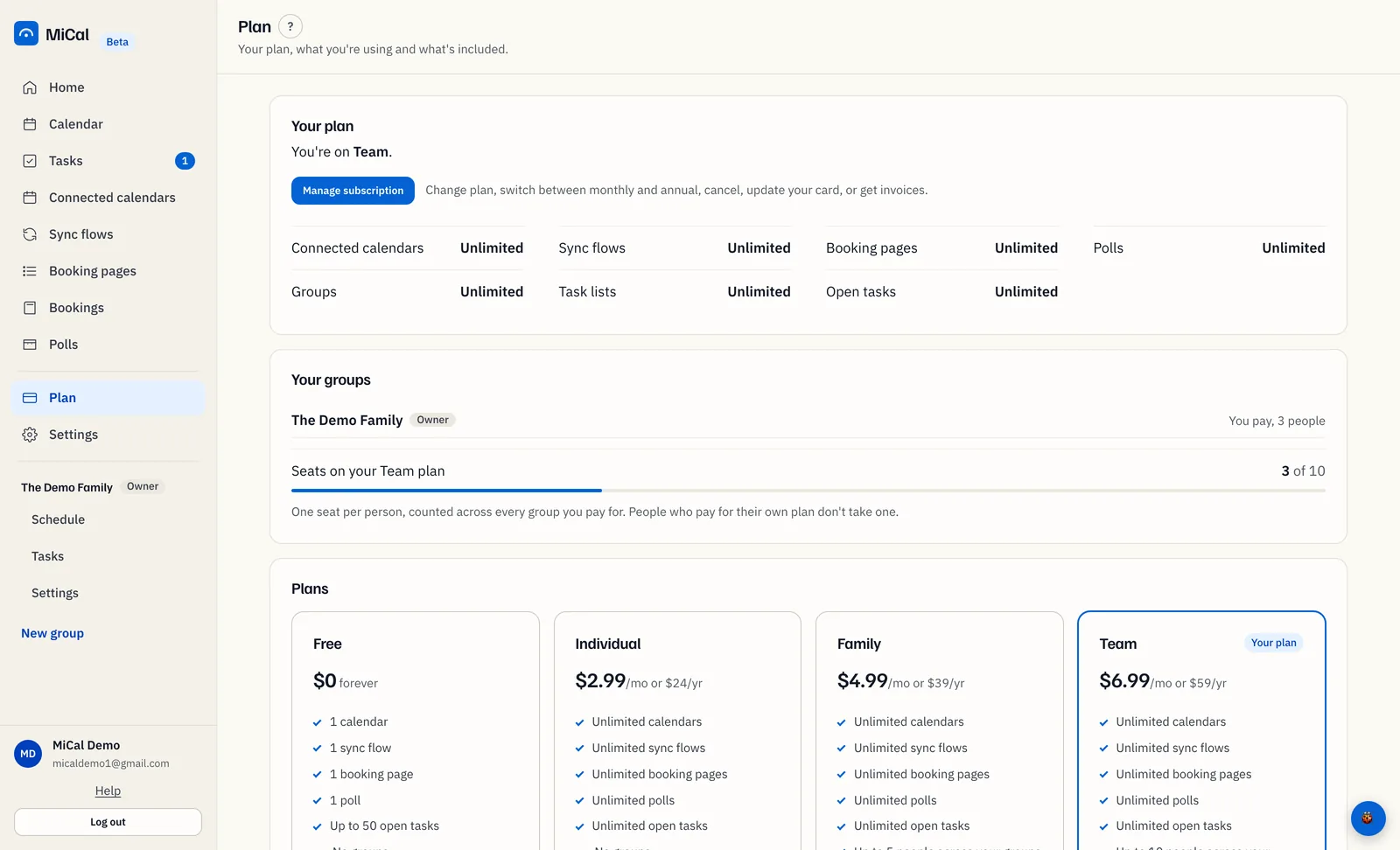
Everyone already in the group keeps access. The new limit applies to new invites.
Notes
Not paying yet? On a trial or a gift, the Team card says Upgrade to Team and opens checkout.
Seats are counted once per person across every group you pay for.
The group stays a Family group. Team changes your plan, not the group's settings. To change the group's type, select Change to team under the group name in its Settings.
More than 10 people? Email support@mical.net.
Still stuck? Email support@mical.net. Privacy · Terms