Read your Home page
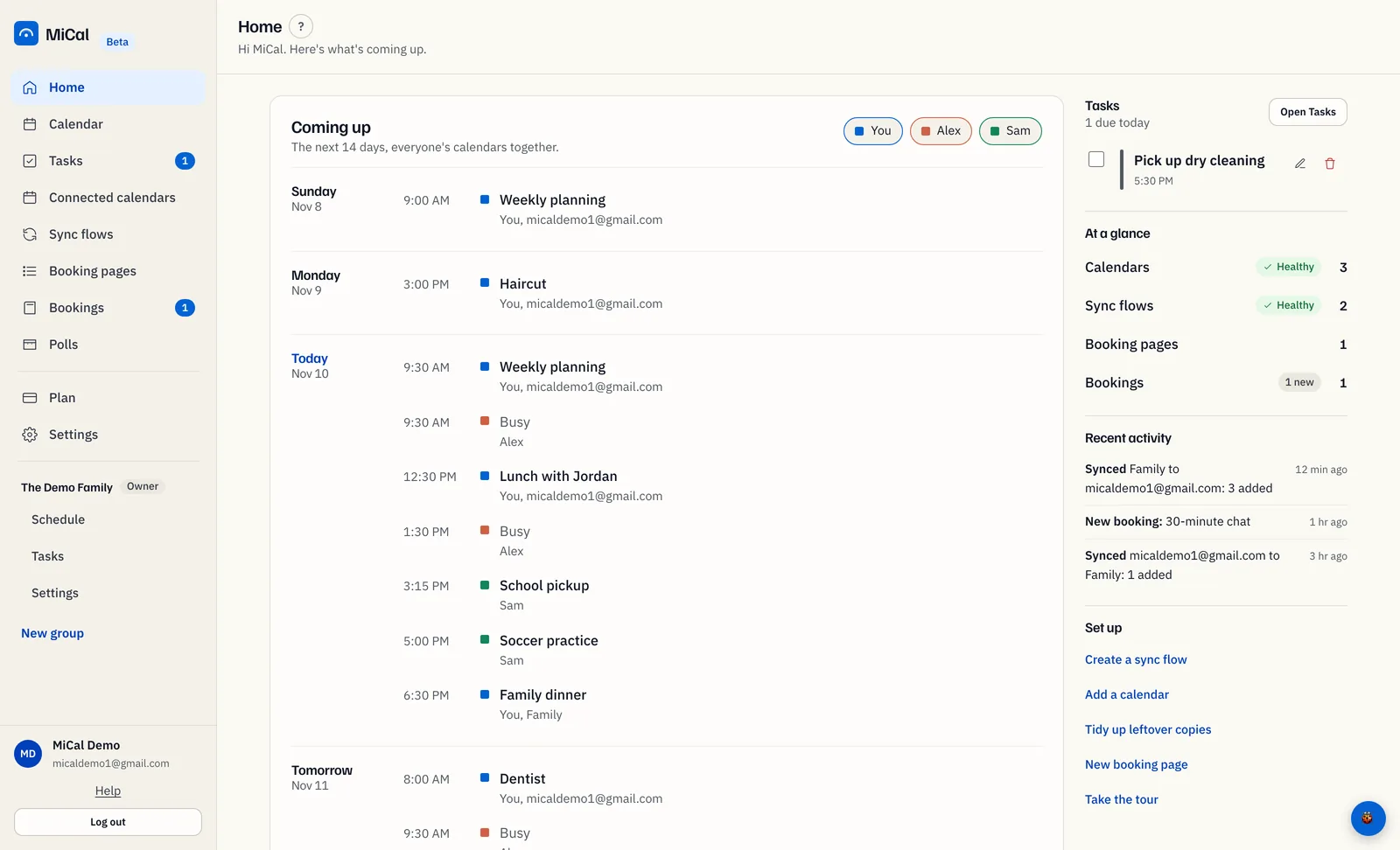
Home shows what is coming up on your calendars and whether syncing and bookings are healthy.
Before you start
Connect at least one calendar. With none, Home shows Start with one calendar and buttons to connect Google, Outlook, or iCloud.
Steps
Sign in. MiCal opens on Home. To come back later, select Home in the sidebar. On a phone, the first screen is Today. Tap More, then Home, for this page.
Read Coming up. It lists the next 14 days from all your connected calendars, grouped by day. Each row has the time (or All day), the title, and the calendar it came from. Times follow your device's time zone.
If you belong to a group, Coming up also shows what the others share, with a colored chip for each person. Select a chip to hide or show that person. A calendar shared as free/busy only shows as Busy.
Select one of your own events to open it. You can edit it or delete it there. A copy that MiCal made through a sync flow cannot be changed here. Change the original and the copy follows.
Check Needs a look. It appears only when a sync flow has a problem. Each row names the flow and says The last sync failed or No recent syncs, with when it last ran. Select a row to open Sync flows. If you see this, read Fix a sync that stopped.
Read At a glance. It counts your Calendars, Sync flows, Booking pages, and Bookings. Select a row to open that page. The pill beside a count shows its health.
Scan Recent activity. It shows your last 5 sync runs and new bookings, newest first.
Use Set up for shortcuts such as Add a calendar, Create a sync flow, and Take the tour.
What the pills mean
Each pill shows how recently your sync flows ran. The full list is in Fix a sync that stopped.
Notes
If Tasks is on for you, a Tasks card shows what is due today and what is overdue. Select Open Tasks to see all of it.
What to do next cards suggest a missing step, such as adding a calendar or a booking page. They go quiet once you have used two of sync, a group, and a booking page.
Sync runs about every 10 minutes.
Still stuck? Email support@mical.net. Privacy · Terms